Audio to video technology has become increasingly important for creators, marketers, and educators who want to turn spoken content into engaging visual formats. Whether it is podcasts, voiceovers, interviews, or AI-generated narration, converting audio into video helps extend reach across platforms like YouTube, TikTok, and social media feeds.
The best audio to video tools combine automation, customization, and ease of use. They allow users to sync visuals with audio, generate animations, add subtitles, and maintain consistent branding. Below is a carefully curated list of five platforms that stand out for their capabilities, usability, and flexibility in transforming audio into video content.
Pollo AI – All-in-One Audio to Video Tool
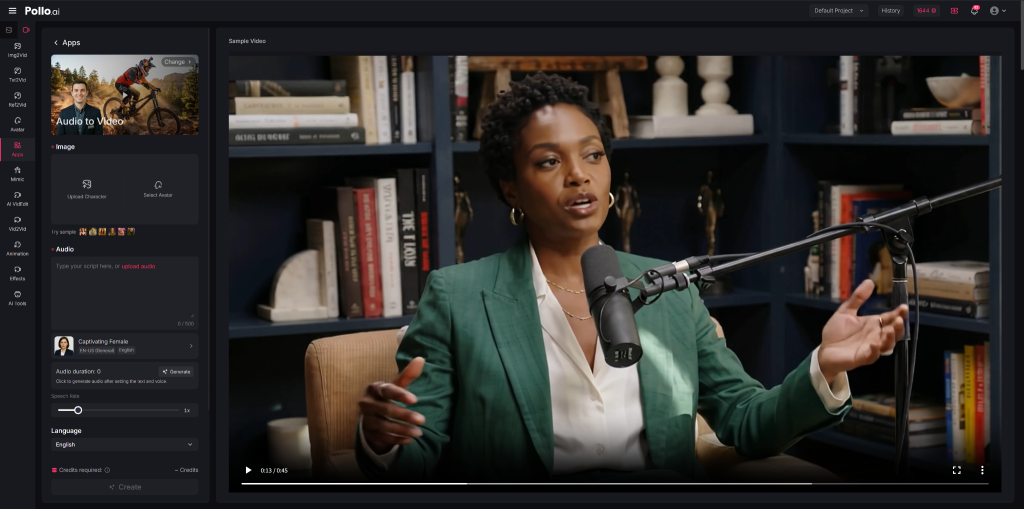
Pollo AI is designed as an all-in-one audio to video tool that can transform audio recordings into polished visual content within minutes. It supports a wide range of inputs, including speeches, voiceovers, podcasts, and music tracks, converting them into complete, shareable videos. A key feature is its use of lifelike AI avatars with accurate lip-sync, allowing audio to be presented through realistic digital presenters without requiring filming.
Beyond avatar-based delivery, the platform enhances audio with context-aware visuals, animations, and graphics to better communicate the message. It also enables customization such as adjusting aspect ratios, adding background music, and refining visual styles. Additionally, Pollo AI supports rapid repurposing, helping users turn long-form audio into short-form videos optimized for platforms like TikTok, Reels, and Shorts.
Why Choose It

Pollo AI is particularly well suited for users who want to scale audio to video production without relying on traditional video shoots. It is commonly used by podcasters, marketers, educators, and content creators who need to transform audio into engaging visual formats for multiple channels. The ability to generate talking avatar videos makes it useful for delivering messages in a more personal and accessible way.
Its main advantage lies in combining automation with versatility. Users can quickly repurpose existing audio into different video formats, increasing content reach with minimal effort. It is also effective for building a consistent video presence using only voice input, making it a practical solution for those who prefer not to appear on camera while still producing professional-quality content.
HeyGen – AI Avatar-Based Audio to Video Creation
HeyGen focuses on converting audio into video using AI-generated avatars that can deliver speech naturally. The platform allows users to upload audio or input scripts, which are then synchronized with a digital presenter. This approach eliminates the need for traditional filming, making video production more accessible and efficient.
It includes a range of avatars, languages, and voice options, enabling users to create localized content for different audiences. The platform also supports customization features such as background adjustments, text overlays, and branding elements. These capabilities make it suitable for producing structured and professional-looking videos from audio sources.
Why Choose It
HeyGen is particularly effective for use cases that require a human-like presence without the complexity of recording real footage. It is commonly used for corporate presentations, training materials, and marketing communications where consistency and clarity are important. The avatar-based format helps standardize content delivery.
Its strengths lie in accurate lip-syncing and ease of production. Users can generate videos quickly while maintaining a professional appearance. This makes it a strong option for businesses that need scalable video content with a consistent on-screen presenter across multiple projects.
InVideo – Flexible Audio to Video Editing and Templates
InVideo provides a flexible environment for audio to video creation by combining templates with manual editing tools. It supports adding voiceovers to pre-designed layouts, allowing users to quickly generate videos without starting from scratch. The platform is designed to balance automation with customization.
Users can align visuals with audio, insert stock footage, and apply transitions to enhance the final output. InVideo also includes features such as subtitle generation, media libraries, and branding tools. These elements help streamline the production process while maintaining a degree of creative control.
Why Choose It
InVideo is well suited for users who want a balance between speed and flexibility. It is commonly used by social media managers, marketers, and small businesses that need to produce content regularly while still customizing visuals to match their brand identity. The template system helps reduce production time significantly.
Its advantage lies in its hybrid approach, offering both guided workflows and editing freedom. This makes it a practical choice for users who want more control than fully automated tools but still need efficiency in their audio to video production process.
Canva – Beginner-Friendly Audio to Video Design
Canva offers a user-friendly approach to audio to video creation by integrating audio editing into its visual design platform. Users can upload audio files and combine them with images, animations, and text using a simple drag-and-drop interface. This makes it accessible to users with little to no video editing experience.
The platform includes a large library of templates, graphics, and animations that can be easily customized. Its timeline-based editing allows users to synchronize audio with visual elements, while maintaining a clean and intuitive workflow. This simplicity is one of its defining characteristics.
Why Choose It
Canva is best suited for beginners and teams that prioritize ease of use over advanced functionality. It works well for creating social media content, presentations, and lightweight marketing videos from audio inputs. The straightforward interface reduces the learning curve significantly.
Its key strength is accessibility. Users can quickly produce visually consistent videos without needing technical expertise or external tools. This makes it an efficient option for fast content creation, especially in environments where simplicity and speed are more important than advanced customization.
Synthesia – Professional Audio to Video with AI Presenters
Synthesia specializes in generating professional videos from audio or text using AI presenters. The platform creates videos with realistic virtual presenters that deliver content in a structured format. This makes it particularly suitable for business and educational applications.
It supports multiple languages and includes features such as slide integration, branding customization, and background selection. These tools allow users to produce polished and consistent videos at scale. The focus is on clarity, structure, and professional presentation.
Why Choose It
Synthesia is ideal for organizations that need consistent and scalable video production for training, onboarding, or instructional purposes. Its structured format ensures that content remains uniform across different videos, which is important for corporate communication.
Its main advantage is efficiency combined with professionalism. Users can create high-quality videos without traditional production resources, making it a reliable choice for teams that prioritize clarity and consistency in their audio to video workflows.
Conclusion
Selecting the right audio to video platform depends on specific needs, such as scalability, ease of use, or creative flexibility. Pollo AI stands out for its all-in-one capabilities, while other tools focus on specialized strengths like avatars, templates, or simplicity.
As audio content continues to grow, converting it into video formats becomes increasingly valuable. These tools provide practical ways to expand content reach while maintaining efficiency in production.